
How to Reset a Genshin Impact Account: Restart, Switch Server or Delete
Fact-checked before publishing
You can’t reset a Genshin Impact account back to zero. There’s no reset or restart button, so a fresh start means making a new HoYoverse account, starting over on another server, or deleting the account for good.
Each route costs you something different. A new account or a new server keeps your current progress. Deletion wipes every HoYoverse game on the account once a 30-day window runs out, paid Genesis Crystals included.
The steps for each option are below, checked against HoYoverse’s own help pages in September 2026.
Key takeaways
- Genshin Impact has no in-game reset. Your options are a new account, a new server, or deleting the account.
- A new HoYoverse account needs an email address or phone number that has never been tied to one, or, on console, a PSN or Xbox login that has never been linked to one.
- Progress is saved per server. Your original save is still there if you start on another server, and HoYoverse doesn’t move progress between servers.
- Deleting your HoYoverse account wipes every linked HoYoverse game and all currency once the 30-day window ends.
- Reinstalling or clearing the cache won’t cost you progress. It’s stored on HoYoverse’s servers.
Table of contents
- Can you reset a Genshin Impact account?
- Which reset option fits what you want?
- How do you start over with a new HoYoverse account?
- How do you restart Genshin on a different server?
- How do you delete a Genshin Impact account?
- What do you lose when you reset or delete?
- Does restarting the game reset your progress?
- Can you skip the early game instead of starting over?
- Does this work the same in Honkai Star Rail, ZZZ and Wuthering Waves?
- Which fresh start should you pick?
Can you reset a Genshin Impact account?
No. Genshin Impact has no reset button, in the game or on the web. The HoYoverse Account Center lets you create an account or delete one. Nothing in it resets progress. Every “reset” players talk about is one of three workarounds: a new account, a new server on the same account, or full deletion.
Which reset option fits what you want?
Pick by what you’re trying to fix. A bad starting pull calls for a new account. Curiosity about another region calls for a new server. Quitting for good is the only case for deletion. The table lines up each goal with the option that fits and what it costs you.
| You want | Best option | What you lose |
|---|---|---|
| A better starting pull | New HoYoverse account | Nothing on your old account. The new one starts from zero. |
| A different region, or friends on another server | Same account, new server | Nothing on your original server. The new server starts blank, and its progress can never be moved later. |
| To quit and remove your data | Delete the HoYoverse account | Everything, across every linked HoYoverse game, paid currency included. Reversible only within 30 days. |
| To skip the early game | Start from a reroll or starter account | Your old account stays as it is. Buying an account breaks HoYoverse’s terms of service and carries ban risk. |
How do you start over with a new HoYoverse account?
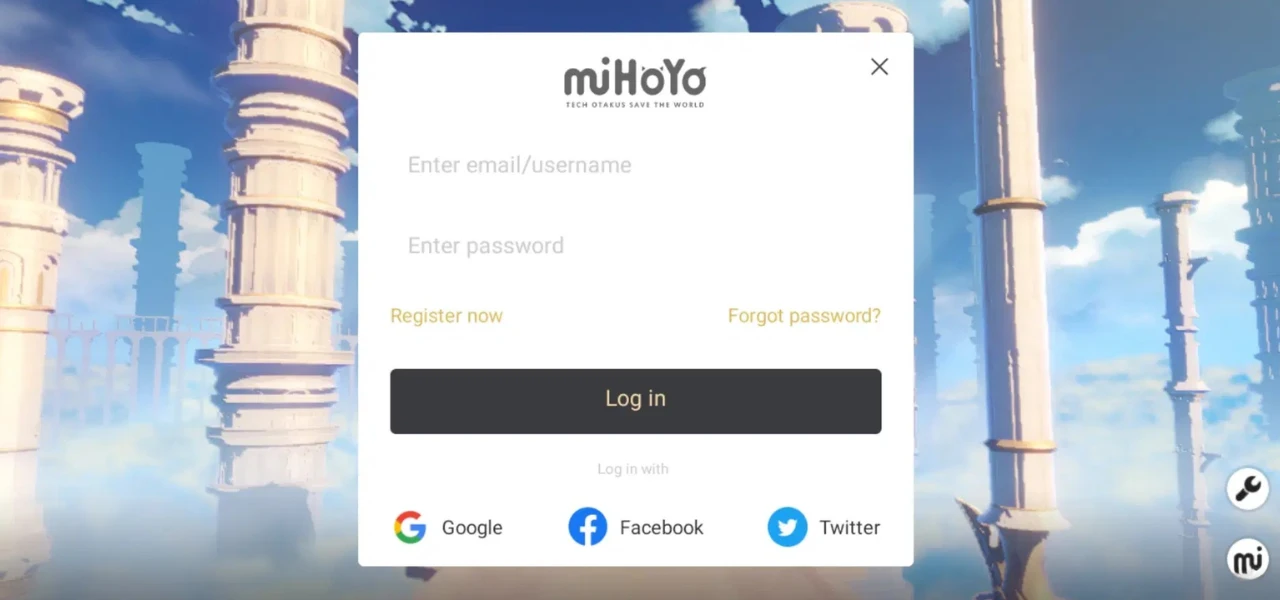
Register a second HoYoverse account with an email address or phone number that has never been tied to one. Log in to Genshin with it and you start from zero. Your old account stays exactly as you left it, and you can log back in to it whenever you like.
- Open the HoYoverse Account Center and choose to register a new account.
- Enter an email address or phone number that isn’t linked to any HoYoverse account.
- If you used email, open the verification link HoYoverse sends to that inbox.
- Log in to Genshin Impact with the new account.
On console there’s a second route. Link a PlayStation Network or Xbox login that has never registered a HoYoverse account, and that link creates a fresh HoYoverse account automatically.
This is also how rerolling works: players make a new account, check their early pulls, and repeat until they like the result. Our guide on what a reroll account is covers that in more detail.
How do you restart Genshin on a different server?
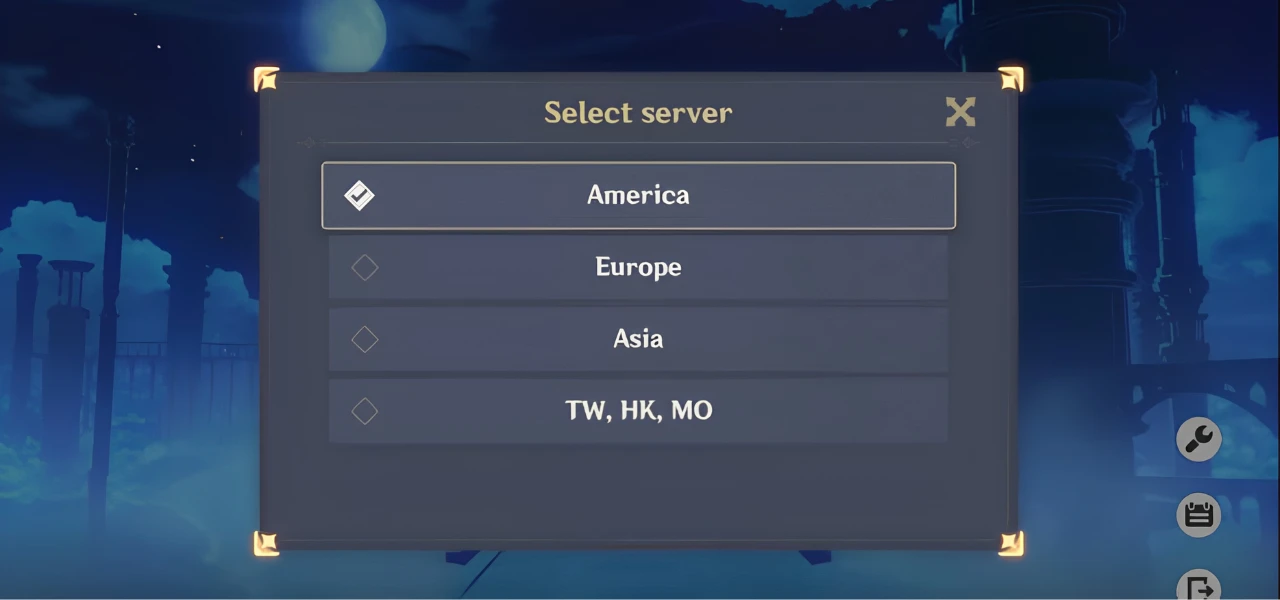
Log in with the same HoYoverse account and pick another server. Genshin saves progress separately on each server, so a new one starts blank and your original save is waiting when you switch back. The catch: HoYoverse doesn’t move accounts between servers, so whatever you build on the new server stays there permanently.
Genshin’s servers include Asia, Europe, America and TW/HK/MO. One HoYoverse account can hold a separate, independent save on each of them.
You choose the server on the game’s login page before you enter the world. On PlayStation there’s no free choice: the server follows the region of your PlayStation Network account.
Server choice is permanent. HoYoverse’s support article on transferring an account to another server says so directly, so a save you build on Europe can never be moved to America, and the other way round. Pick the server you plan to stay on.
How do you delete a Genshin Impact account?
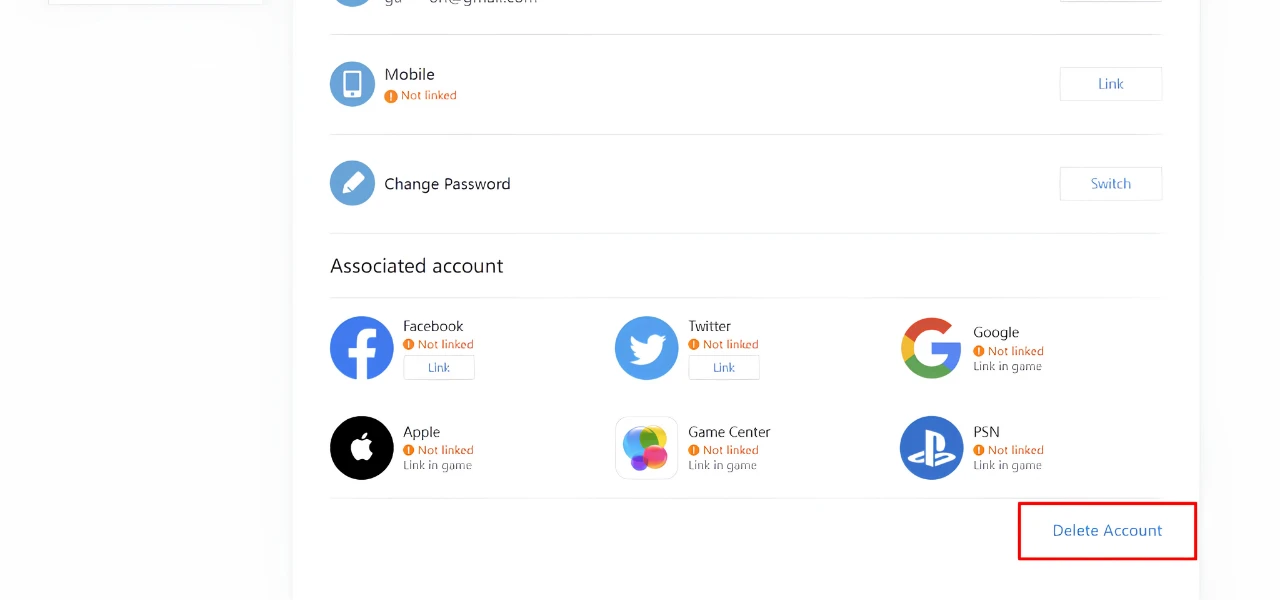
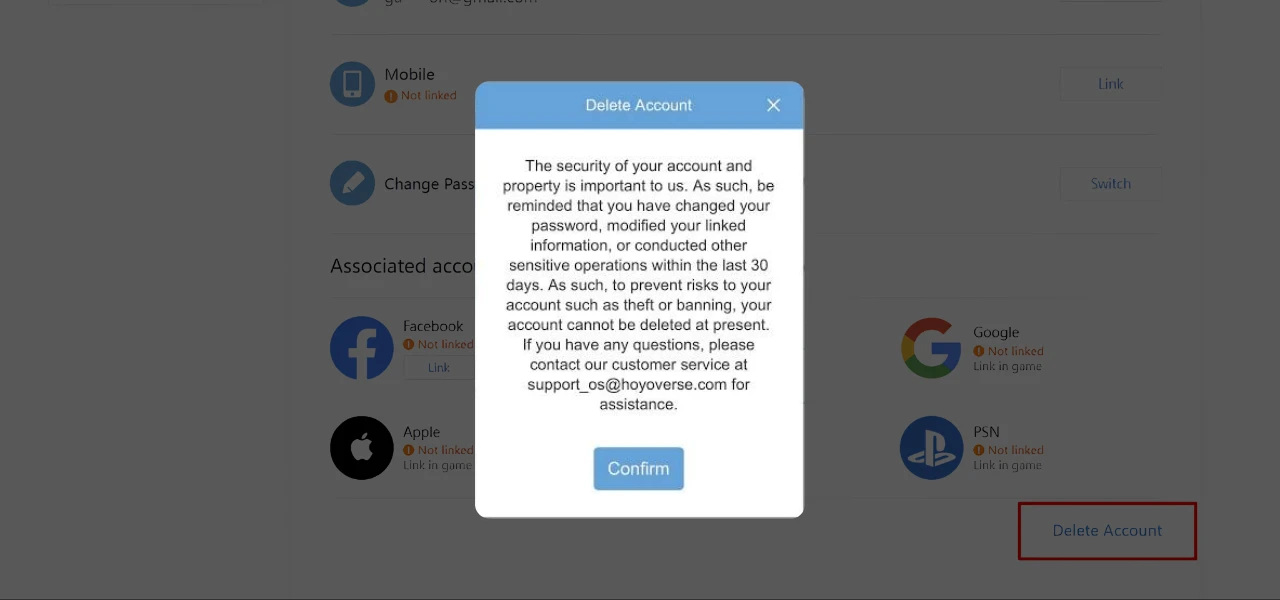
You delete the whole HoYoverse account, because HoYoverse can’t delete a single game’s data. Request it in the Account Center under Personal Information, verify your identity and confirm. A 30-day window follows. Log in during that window and the request is cancelled. Stay away and the account is gone for good.
Deletion steps
- Log in to the HoYoverse Account Center.
- Open Personal Information in the left menu.
- Select Request to Delete Account at the bottom right.
- Verify your identity.
- Confirm the request.
The 30-day window
Submitting the request starts a 30-day confirmation period. Log in at any point in those 30 days and the request is cancelled and the account reactivated. If you never log in, the account is deleted automatically when the period ends, and it can’t be recovered.
Changed your mind? Log in to your HoYoverse account before the 30 days are up and the deletion request is cancelled.
Deletion takes every game on the account with it. If Honkai: Star Rail, Zenless Zone Zero or Honkai Impact 3rd are linked to the same HoYoverse account, their data is deleted too, permanently.
What do you lose when you reset or delete?
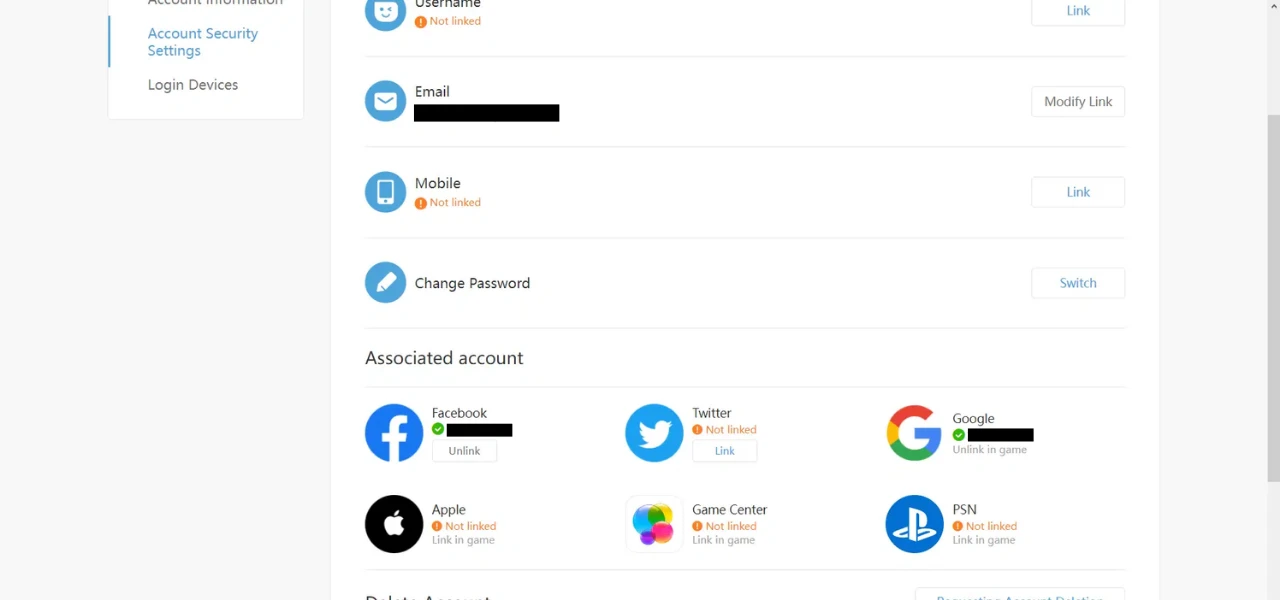
With a new account or a new server, you lose nothing: you keep the old save and start again on a clean slate. Deletion is different. It erases every linked HoYoverse game, all currency including paid top-ups, time-limited benefits and unclaimed rewards. None of it is refunded, restored or transferred to another account.
| What happens to | New account | New server | Delete account |
|---|---|---|---|
| Your current save | Kept on the old account | Kept on the original server | Deleted after 30 days |
| Genesis Crystals and Primogems | Stay on the old account | Stay on the original server | Erased, no refund |
| Other HoYoverse games | Unchanged | Unchanged | Deleted |
| Going back | Log in to the old account | Pick the original server | Only by logging in within 30 days |
Paid currency and top-ups
Currency is bound to the account. That covers Genesis Crystals you bought with real money as well as Primogems you earned. Once the account is closed, none of it comes back.
Since version 5.8, Genesis Crystals bought on PlayStation and on PC or mobile share one balance once your HoYoverse account has completed cross-save. Deleting the account wipes that whole shared balance, whichever platform you topped up on.
PlayStation and Xbox links
On console, your PSN or Microsoft account is linked to your HoYoverse account. You can unlink it yourself in the Account Center under Linked Accounts (Link Account in HoYoverse’s Microsoft guide), but only once per PSN or Microsoft account.
To move your console to a fresh account, start with your current one: if it was created on the console itself, with no email login, link an email and password to it in Settings > Account > User Center. Next, create the new HoYoverse account on the web. Then unlink your PSN or Microsoft account in the Account Center, launch the game on your console and link the new one: on PlayStation choose Login with existing account, on Xbox rebind it in the pop-up window. Because the self-unlink works only once, set up the new account before you use it.
Does restarting the game reset your progress?
No. Restarting, reinstalling, clearing the cache or moving to a new phone won’t change your account. Genshin records progress to HoYoverse’s servers as you play, so characters, Adventure Rank and currency all come back when you log in. Only local settings reset, such as graphics, language and your saved login.
If you searched “how to restart Genshin Impact” because the game froze or won’t load, a client restart or a reinstall is safe. If you want your account back at zero, use one of the three options above.
Can you skip the early game instead of starting over?
Yes. A reroll or starter account is a fresh account that already has characters pulled, and you take over from there. It skips the grind of rerolling yourself. Be clear on the risk: buying or selling accounts breaks HoYoverse’s terms of service, and a traded account can be banned.
Making extra accounts to reroll is a separate question. Community reports agree that creating new accounts for a better starting pull isn’t bannable by itself. That comes from players, not from an official HoYoverse statement. The enforcement risk sits with account trading.
What we control: we check every account by hand against its listing before we list it. We email it to you, usually within minutes of payment (up to 24 hours in rare cases), and if it hasn’t arrived after 24 hours, you can ask us to cancel the order for a refund. A 5-day warranty starts on the day you buy. It covers an account that doesn’t match its description, or one the original source takes back. Extended Warranty at checkout replaces the 5 days with 30 or 60. Our refund policy has the full terms. What we can’t control is how HoYoverse enforces its terms.
All sales are final, because accounts are digital products. The warranty and the 24-hour delivery rule above are the exceptions, on the terms in our refund policy.
Browse Genshin Impact starter accounts, or see character and Primogems accounts. The hub shows current prices and stock.
 Genshin Impact accountsEmail delivery, usually within minutesBrowse
Does this work the same in Honkai Star Rail, ZZZ and Wuthering Waves?
Honkai: Star Rail and Zenless Zone Zero run on the same HoYoverse account as Genshin, so every rule here applies unchanged, including the 30-day deletion window. Wuthering Waves is Kuro Games’ own system. It has no self-service deletion: you request it from support, and there’s no stated grace period.
- Honkai: Star Rail: same HoYoverse account, same per-server saves, same 30-day deletion window.
- Zenless Zone Zero: same HoYoverse account, so account creation, deletion and the 30-day window work exactly as they do for Genshin.
- Wuthering Waves: progress stays on the server you chose and doesn’t carry to another region. Within one server it syncs across PC, mobile and PS5. Deletion is a support request to Kuro Games.
| Game | Account system | Self-service deletion |
|---|---|---|
| Genshin Impact | HoYoverse | Yes, 30-day window |
| Honkai: Star Rail | HoYoverse | Yes, 30-day window |
| Zenless Zone Zero | HoYoverse | Yes, 30-day window |
| Wuthering Waves | Kuro Games | No, request via support |
Starting over on purpose? The Genshin Impact reroll guide shows what an attempt costs in time.
FAQ
Can I reset Genshin without affecting my other HoYoverse games?
Yes, if you make a new account or start on a new server. Both keep everything else on your HoYoverse account as it is. Deletion is the one route that can’t be limited to Genshin: it wipes every game and service linked to the account.
Will I lose my account if I switch servers in Genshin Impact?
No. Your save on the original server stays exactly as it was. The new server starts blank, and HoYoverse doesn’t transfer progress between servers.
Can I cancel a Genshin account deletion request?
Yes. Log in to your HoYoverse account at any point in the 30 days after the request and it’s cancelled automatically. After 30 days the account is permanently deleted.
Do I get my Genesis Crystals back if I delete my account?
No. In-game currency, including Genesis Crystals you paid for, is bound to the account. It can’t be refunded, restored or transferred once the account is closed.
Can you get banned for rerolling in Genshin Impact?
Community reports agree that making new accounts to reroll isn’t bannable on its own. That comes from players, not from an official HoYoverse statement. Buying, selling or sharing accounts does break HoYoverse’s terms of service and can lead to a ban.
Does reinstalling Genshin Impact delete my progress?
No. Progress is saved on HoYoverse’s servers. Reinstalling only resets local settings like graphics and language.
Which fresh start should you pick?
For a better starting pull, make a new HoYoverse account. For another region, start on a new server with the account you have. Delete only when you’re done with every HoYoverse game on that account. To skip the early grind entirely, start from a starter account and accept the terms-of-service risk that comes with it.
See the Genshin starter accounts hub for current prices, browse every Genshin Impact account, or find more on the Genshin Impact hub.