Is It Safe to Buy a Genshin Impact Account? Risks and a Seller Checklist
Updated

Buying a Genshin Impact account breaks HoYoverse’s terms of service, and the publisher can act on an account it finds was sold. That is the one risk no seller can remove, us included.
The rest of the risk sits with the seller you pick and with who still holds the login details. This guide covers what HoYoverse says in writing, how a previous owner could take an account back, a checklist for vetting any seller, and what to do in the first hour after delivery.
We sell accounts, so we say where our control ends. We handle checks, delivery and warranty. We don’t decide what HoYoverse does.
Key takeaways
- Selling or transferring an account is barred by the Genshin Impact terms (Sections 2 and 8), and HoYoverse’s own notice (September 2020) lists accounts obtained through account selling among those it can take action on.
- We found no ban rate or detection method published by HoYoverse. “The publisher can act” is the honest claim, and nobody can give you the odds.
- Password resets run through the registered email, and a linked phone is a second way in. Secure the included email first, then follow our 5 to 10 day recommendation before touching the rest.
- Check any seller for a detailed listing, written delivery and warranty terms, public reviews and a straight answer on what is linked to the account.
- Three routes skip account trading altogether: keep your own account, reroll new ones, or buy Genesis Crystals through HoYoverse’s official channels.
Contents
- Is it safe to buy a Genshin Impact account?
- What do the Genshin Impact terms say about buying an account?
- Can you get banned for buying a Genshin Impact account?
- Can the original owner take a bought Genshin account back?
- What other risks come with buying a Genshin account?
- How do you check a Genshin account seller before you pay?
- What should you do in the first hour after getting the account?
- What do we check, and what can’t we control?
- Is there a safer way to get what you want than buying an account?
- The short version
Is it safe to buy a Genshin Impact account?
No. HoYoverse’s terms bar account sales, and its own support article says so plainly: “Please do not buy, sell, or share accounts.” Past that rule, the practical risks are the publisher acting, the previous owner recovering the account and a bad seller. You can shrink the last two. Nobody can remove the first.
| Risk | What the sources say |
|---|---|
| Publisher action | The September 2020 notice names accounts obtained through account selling among those it will act on. The terms let it terminate a sold account without refund. |
| Previous owner takes it back | Resets run through the registered email or a linked phone. Whoever still holds either can start one. |
| Recovery goes wrong | HoYoverse says recovery needs ownership verification and is not guaranteed. |
| Unofficial top-ups | Barred by Section 10. HoYoverse lists suspension over charged-back transactions as a risk. |
| You hold the credentials afterwards | Section 2 puts responsibility for use of the account on the account holder. |
The sections below cover each row.
What do the Genshin Impact terms say about buying an account?
Three parts of the Genshin Impact terms of service (last updated May 20th, 2026) apply to a sold account. Section 2(g) bars transferring or sharing an account, and using another user’s. Section 8(b) bars transferring or selling virtual currency and goods. Section 10 covers enforcement and top-ups through channels HoYoverse hasn’t approved.
- Section 2(g). You may not transfer, share or “make your Account information available to third parties”, nor “use other User(s)’ Account(s) at any time”. That second part is the clause that reaches a buyer. If you sell or transfer control of the account, the publisher may terminate it immediately, without any refund.
- Section 8(b). Virtual currency and goods are licensed to you, and you may not transfer, sell, gift, exchange or trade them. That is the currency and goods on a listing.
- Section 10. Lists what the publisher may do about a breach: warnings, blocking, suspension (including for an indefinite period) and terminating the account. It also bars top-ups through third parties HoYoverse hasn’t approved.
- Section 2, on responsibility. You answer for what happens through your own credentials, and HoYoverse doesn’t compensate you when a third party gets in. After a sale, the buyer is the one holding them.
For how the term “reroll account” maps to these rules, see what a reroll account is.
Can you get banned for buying a Genshin Impact account?
The publisher can act. HoYoverse’s notice on scripts and third-party software (September 2020) lists “any account obtained through account selling/exchanging” among the accounts it will take measures against, “including but not limited to warnings and account suspensions”. We found no ban rate or detection method published by HoYoverse, so nobody can honestly give you the odds.
The notice on HoYoLAB adds a caveat about history: HoYoverse says it can’t guarantee that an account obtained through selling hasn’t used plug-ins or third-party software before. The account may carry whatever it did under earlier owners, and you can’t see that record.
The version on the official site goes further. It lists removal of inappropriately obtained rewards, account suspension and permanent banning as measures for serious violations, and it names top-ups through non-official channels as a violation.
What HoYoverse doesn’t say
We read the terms, the two notices and the Help Center articles on accounts. None gives a count of banned purchased accounts, and none describes how HoYoverse spots one. Figures that circulate online tend to lump account sales in with leaks, cheats and private servers, so we don’t quote them.
One HoYoLAB report is about currency top-ups, not account sales: a player says a top-up website refunded their payment weeks later, that they now owe HoYoverse money and that they expect a ban (August 2026). That is one unverified report. It fits HoYoverse’s own warning about charged-back transactions, and it tells you nothing about how often this happens.
Can the original owner take a bought Genshin account back?
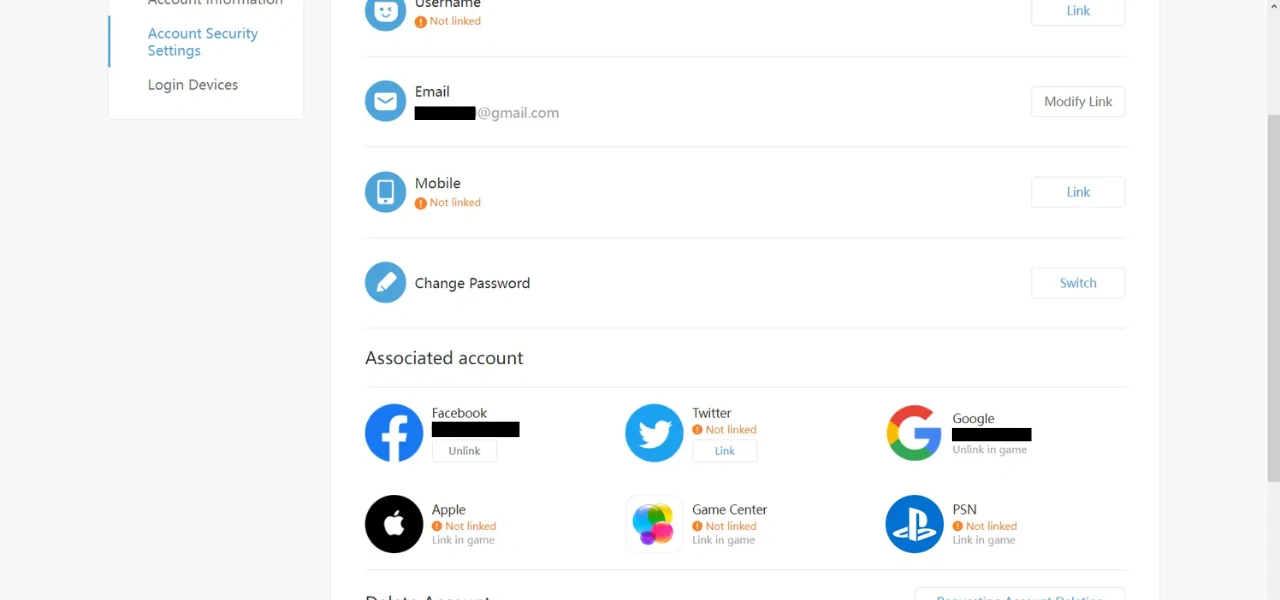
Yes, if they still hold a way in. HoYoverse password resets run through the registered email or username, with a code sent by email or SMS. Anyone who still controls that email, or a linked phone number, can start a reset. Closing those doors is the buyer’s job, and the sooner the better.
| Door | Why it matters |
|---|---|
| Registered email | Resets and new-device codes go here. Changing the email can prompt a code to the current address first, so whoever holds it can act. |
| Linked phone number | HoYoverse offers SMS verification when the email isn’t reachable. A number the seller keeps is a second route. |
| Third-party logins | Google, Apple, Facebook and similar logins can be unlinked only once another login method (email or phone) is active. |
| Deletion | Whoever holds the credentials can delete the account. Deletion wipes every linked game after a 30-day window, and currency isn’t restored. |
If a dispute does reach HoYoverse, the hacked or lost account article sends you to the Account Issues Application Form. It asks for ownership details, and HoYoverse states “account recovery is not guaranteed”. For a lost email, HoYoverse’s email access article adds that forms can’t be edited or withdrawn after submission, and no timeline is given.
HoYoverse doesn’t say how it treats a dispute between a seller and a buyer. It makes no claim either way, and we won’t guess.
What other risks come with buying a Genshin account?
The other risks are shared or hacked accounts, unofficial top-ups and the wrong server. HoYoverse said in a November 2020 notice that of the at-risk accounts it reviewed, “the vast majority of them were being shared by more than one person”. An account passed through many hands has an unknown history and more people who know the login.
- Shared credentials. HoYoverse tells players never to share an account or hand credentials and verification codes to third parties. A seller who keeps a copy of the login breaks that advice.
- Charged-back top-ups. HoYoverse says third-party top-up is “strictly prohibited” and lists account suspension due to “illegal or charged-back transactions” as a risk. Ask what the listed currency came from.
- The wrong server. Server migration isn’t offered and the server is set at first login. A bought account on the wrong region can’t be moved.
- Seller scams. A seller who takes payment and disappears, or hands over an account and then reclaims it, is the risk that sits outside the publisher. The checklist below targets it.
How do you check a Genshin account seller before you pay?
Check five things on any seller before you pay: what the listing states, what gets handed over, what the delivery terms say, what buyers have publicly written, and what the warranty covers. Any seller can be held to this list. A seller who dodges one of them has told you something.
| Check | Good sign | Red flag |
|---|---|---|
| Listing | States the server, the Adventure Rank and every character on it | Vague or reused screenshots |
| Hand-over | Game login plus full access to the included email, and a straight answer on any linked phone or social logins | Refuses to say what else is linked |
| Delivery terms | Written timing and a written rule for orders that never arrive | “Message us after paying” |
| Public reviews | Readable, dated, on a page you can find without the seller’s help | Only quotes on the seller’s own banner |
| Warranty | Length, what it covers and how a claim works, in writing | Promises of “no ban” or a warranty with no terms |
Two more habits help. Pay only through the seller’s own checkout, and walk away from anyone who asks for extra fees after payment.
Our public buyer feedback is on the customer reviews page.
What should you do in the first hour after getting the account?

Check the delivery matches the listing, then secure the included email: change its password and turn on 2FA. If that email is the one registered to the game account, this closes the email reset route from the table above. After that, log in and look at what is linked, then follow our 5 to 10 day recommendation before changing the rest.
| When | Step | Why |
|---|---|---|
| First hour | Check the delivery against the listing. If it does not match, contact support before changing anything | Our refund policy asks you not to use, modify or access an account that differs significantly from its description |
| First hour | Change the password on the included email and turn on 2FA | Reset and new-device codes are sent to the registered email |
| First hour | Log in, open Account Center, then Account Security, and note the linked email, phone, third-party logins and trusted devices | You can’t close a door you haven’t found |
| First hour | Play normally, and if a “Potential risk detected” message appears, check the registered email and verify there | HoYoverse’s own fix for that message starts with the registered email |
| After 5 to 10 days (our guidance) | Change the game password (HoYoverse advises 12 or more characters) and turn on 2FA in the game account | HoYoverse says 2FA protects purchases and progress from unauthorised access |
| After 5 to 10 days (our guidance) | Remove unfamiliar trusted devices, then unlink any phone or third-party login that isn’t yours | Each is another way into the account |
The 5 to 10 days is our recommendation for HoYoverse games, not a HoYoverse rule. HoYoverse gives no number of days. It does show risk messages on new logins, and we suggest waiting them out before changing more than the email.
What do we check, and what can’t we control?
We check each account by hand against its listing before it goes up, we deliver, and each account comes with a 5-day warranty under which we will assist with eligible product-related issues. We can’t control what HoYoverse decides about an account, or how it handles a recovery request. Anyone who promises otherwise is selling you something else.
What we control. Delivery is usually within minutes of payment (up to 24 hours in rare cases). If delivery passes 24 hours, you may ask to cancel the order for a refund before it is delivered. Each account carries a 5-day warranty from the purchase date. During it, we will assist with eligible product-related issues, such as an account that doesn’t match its description or loss of access caused by the original source. Extended Warranty at checkout replaces it with 30 or 60 days, and an approved Extended Warranty claim is refunded at the product price minus the warranty fee. All sales are final because the products are digital. Bans or loss of access caused by your own actions after delivery, or from failing to secure the account, are not covered. The full terms are in our refund policy.
Pricing and stock change often, so see the hub for current prices.
Is there a safer way to get what you want than buying an account?
Yes. Three options never touch account trading: keep the account you have, reroll new accounts yourself, or buy Genesis Crystals through HoYoverse’s own channels. Each costs time or money in a different way. None puts a sold account in your hands.
If you want a clean slate on your own account, our guide on how to reset a Genshin Impact account covers it. If you would rather see what a checked account looks like, the Genshin Impact accounts hub lists what we have.
Is rerolling with your own new accounts allowed?
We found no HoYoverse statement that bans rerolling with your own new accounts, and none that endorses it. The terms that restrict accounts cover transfer, sharing, cheating and payment channels. Nothing we read limits how many accounts one person creates. That leaves the question open, and HoYoverse hasn’t promised anything either way.
Where can you buy Primogems officially?
Primogems can’t be bought directly. You buy Genesis Crystals, which convert to Primogems 1:1. HoYoverse names the in-game shop and its Official Top-up Page as its channels, and names Codashop as an official top-up partner. It calls everything else strictly prohibited.
| Channel | What it is |
|---|---|
| In-game shop | Genesis Crystals, converted 1:1 into Primogems (HoYoverse explains the two currencies) |
| Official Top-up Page | sdk.hoyoverse.com/payment/genshin. Log in with your game account and pick the correct server. |
| Codashop | Named by HoYoverse as an official top-up partner |
| Anything else | Called “strictly prohibited” by HoYoverse, with risks including loss of the account and payment fraud |
Comparing sellers? Our guide on where to buy a Genshin Impact account sets marketplaces and shops side by side, with a checklist for any seller.
FAQ
Is a reroll account safe to buy?
Buying one breaks HoYoverse’s terms of service, so no purchase is safe in the sense of being permitted. Careful seller checks and securing the included email lower the practical risks. They don’t remove what the publisher can do.
Can you get banned for buying a Genshin Impact account?
The publisher can act. HoYoverse’s official notice (September 2020) lists accounts obtained through account selling among those it will take measures against, including warnings and account suspensions. We found no ban rate or detection method published by HoYoverse, so nobody can give you the odds.
Can the original owner take a bought account back?
Yes, if they still control the registered email or a linked phone number, because HoYoverse password resets run through both. Secure the included email first, then check what else is linked. HoYoverse says account recovery is not guaranteed and doesn’t say how it treats a seller and buyer dispute.
Is rerollaccount.com legit?
We can’t grade ourselves, so read our refund and delivery terms and our reviews with the checklist in hand. We check each account by hand against its listing, publish our refund and delivery terms, and keep public buyer feedback on our customer reviews page. Read those before you order.
Can I get a refund if a bought account is banned?
All sales are final because the products are digital. During the 5-day warranty we will assist with eligible product-related issues, such as an account that doesn’t match its description or loss of access caused by the original source. Bans or loss of access caused by your own actions after delivery, or from failing to secure the account, are not covered. Publisher enforcement is outside what we control, so read our refund policy for the exact terms before you order.
Is rerolling with my own new accounts allowed?
We found no HoYoverse statement that bans it and none that endorses it. The terms that restrict accounts cover transfer, sharing, cheating and payment channels rather than how many accounts one person creates.
The short version
Buying a Genshin Impact account breaks HoYoverse’s terms, and the publisher can act on it. What you control is the seller you choose, the email you secure in the first hour and the wait before you change the rest. If you decide to go ahead, use the checklist above and pick from the Genshin Impact accounts hub, where current prices are listed.